
An SMM panel can deliver a listed social media service. It cannot make a weak post compelling, guarantee a sale, or promise that TikTok will recommend a video. I want customers to understand that before they spend money. Here is how to read a listing, run a small test, interpret a drop and decide whether another order is worth it.
The short version: Read the service terms, test the smallest permitted quantity, record the starting count, let the order finish, then check what remains after a few days. Buy only with a clear purpose and a budget you can afford to lose.
TFast Hub lists third-party social media services. Each listing has its own platform, minimum and maximum quantity, price, delivery notes and, where offered, refill period. Check the live listing before ordering because providers and rates change. A delivered view or follower count is not a guarantee of real Ugandan customers, sustained engagement, sales, monetisation or recommendation by TikTok. Our terms explain that social platforms may remove activity they regard as artificial and may restrict accounts.
Do not choose a service by its cheapest price alone. A useful comparison asks: Does it accept the link I have? What does “start time” mean here? Is the audience location specified or unspecified? What counts as completed? Is refill available, for how long, and under what conditions? Can I track the order and raise a ticket?
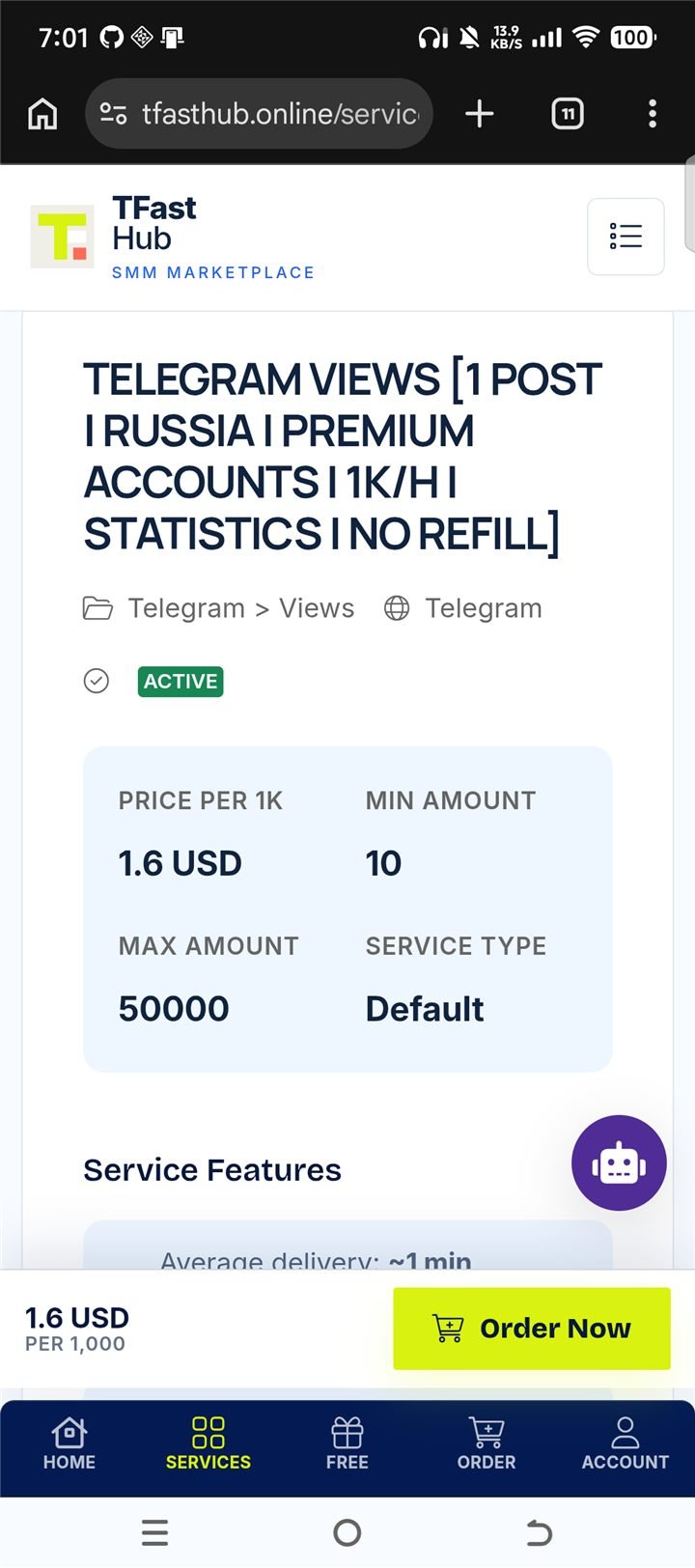
Real service-page example: check the rate, order limits and listing notes. The layout and prices may have changed since this capture.
If a video loses viewers immediately, more paid exposure may simply show that weak opening to more people. The supplied notes use a “three-second hold below 60%” rule. That is an illustrative creative diagnostic, not a TikTok threshold or a guarantee. Review the video's actual retention curve, opening promise, clarity, sound and relevance. Re-cut a confusing first few seconds before spending again.
For example, “Welcome to my page, today I want to tell you…” delays the point. “Here is what UGX 20,000 buys at this Kampala lunch spot” shows a specific reason to watch. Compare versions with your own analytics rather than assuming one benchmark fits every niche.
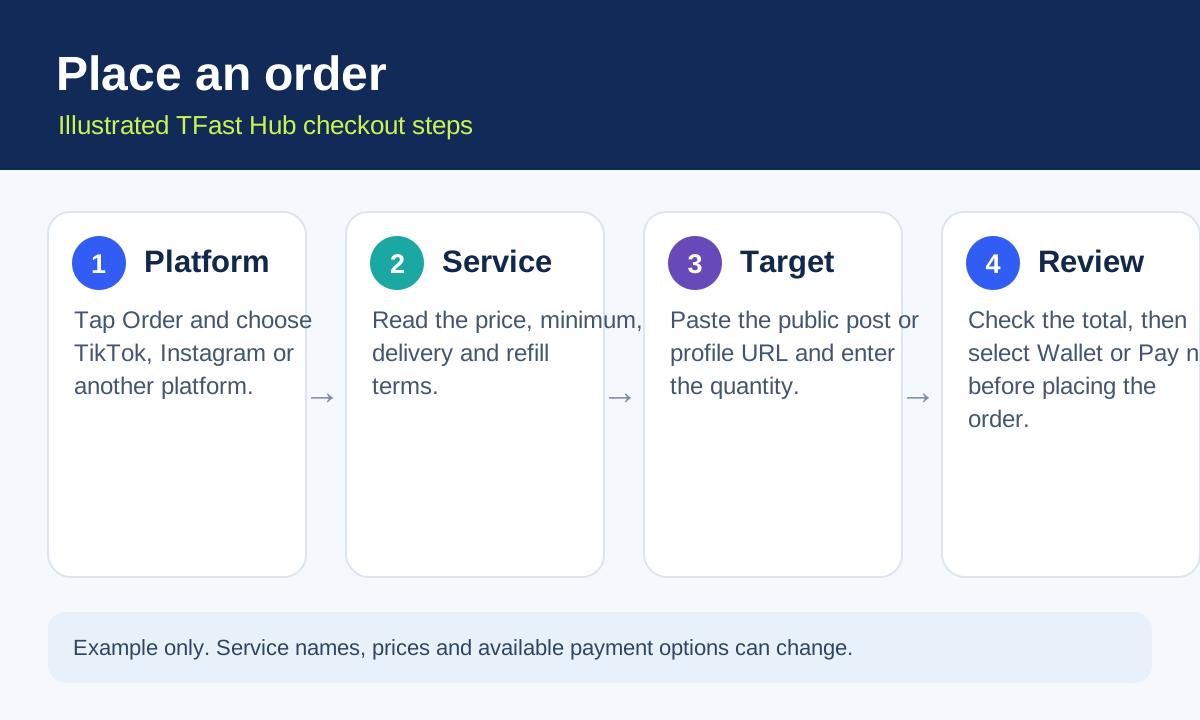
Illustrated order flow. Check the live service terms and total before paying.
Don't delete the post automatically. A lower count does not erase the content or its chance to be found through a relevant search query. Keep it if the post still helps viewers and follows platform rules. You can improve its caption, make a stronger follow-up or use an authorised promotion later. There is no guarantee that a slow drip will revive it.
Measure the drop before ordering again. Suppose you ordered 500 units and 400 remain after the test window. That is a 20% fall from the delivered count, assuming the starting count and other traffic did not change. Track the same metric at the same time each day. If you cannot separate organic traffic from delivered activity, state that uncertainty.
The “order 130%” calculation is only arithmetic. The supplied notes say a 10–25% drop is normal and suggest ordering 520 to retain 400. A 10–25% drop is not a verified rate across our services. Also, 520 with a 25% drop leaves about 390, while 520 with a 23% drop leaves about 400. If your target is important, do not treat over-ordering as insurance; examine the actual service record, spend limit and platform risk first.
Retire the service, not necessarily the entire panel. The supplied notes use a drop above 25% as a rule for removing that service ID from your shortlist. Use that as a personal test criterion, not a published guarantee. Compare several completed orders, check whether the same provider or service terms apply, and report a pattern to support. Another listing may have different conditions.
The source text describes a “seed” as 30 minutes of “gate pressure” that gets a video in front of real people, even if the count falls later. That is a theory, not a demonstrated TikTok mechanism. TikTok says recommendations depend on viewer interactions and content information; it does not publish a fixed gate that purchased activity reliably opens. TikTok may disregard or remove artificial activity. Judge the order on observable outcomes: delivery, retention, qualified visits, enquiries and any valid refill entitlement.
A final count is one measure. The more useful question is whether the campaign created lasting value without violating your risk tolerance.
TFast Hub's refund policy says naturally dropped activity is generally not refundable after a completed order. Some individual services include a refill guarantee; the listing states the period and conditions. If an eligible service drops within that period, request a refill through your account rather than assuming a cash refund. Keep the order ID, screenshots and dates in your ticket. A pending order with no delivery progress for more than 72 hours is among the policy's stated refund-request scenarios; that is different from a completed order that later drops.
Do not promise yourself a refill until you have read the specific listing. If an account is made private, deleted or banned, the published policy says refill guarantees do not apply. The support team reviews the actual record.
They are different products. A panel listing delivers the specified service under its own terms; do not assume accurate Ugandan audience targeting unless the listing explicitly says so. TikTok Promote is TikTok's own paid promotion tool, with objectives and audience settings that vary by campaign and availability. TikTok suggests starting with a strong organic post. It does not guarantee thousands of Ugandan views for UGX 5,000–10,000; the price and forecast shown in your account are the figures to use.
The source text recommends a panel order for every “gate push” and Promote only after a “flatline test.” I would treat that as a proposed workflow, not a rule: first decide whether an SMM service is permitted and worthwhile for your account, then use Promote if you need platform-managed targeting, leads or visits. For a local business, the cost per qualified message or sale matters more than a low cost per view.
For every order, record the service name and ID, price, quantity, start count, completion date, count after three days, refill eligibility, and your actual business outcome. Compare cost per retained unit only if you can reasonably distinguish the delivered units from organic activity. A service with a higher headline price can be better value if it meets your stated objective; a cheaper one can be enough when you only need a limited test.
Open TFast Hub's live catalogue, choose a service that matches your public post and review its current minimum, price and refill terms. If a small test makes sense for your goal, create an account, fund only the amount you intend to spend and place one test order. Review it after completion and, if an eligible refill is needed, use the account's support ticket process. If the service disappoints you, tell us the order ID and what happened; that evidence helps us assess the listing.
Note: Quantities, UGX amounts and drop-rate examples in this guide are illustrative. Rates, provider availability and refill conditions vary by service and may change. Nothing here guarantees a viral video, a stable count, sales or account safety.
TFast Hub terms and platform risks TFast Hub refund and refill policy TikTok: How content is recommended TikTok: About Promote
Browse social media services, place orders and track progress from one account.